Toy Car to Real Car Transition: How the Train Window Trend Works
Last updated:
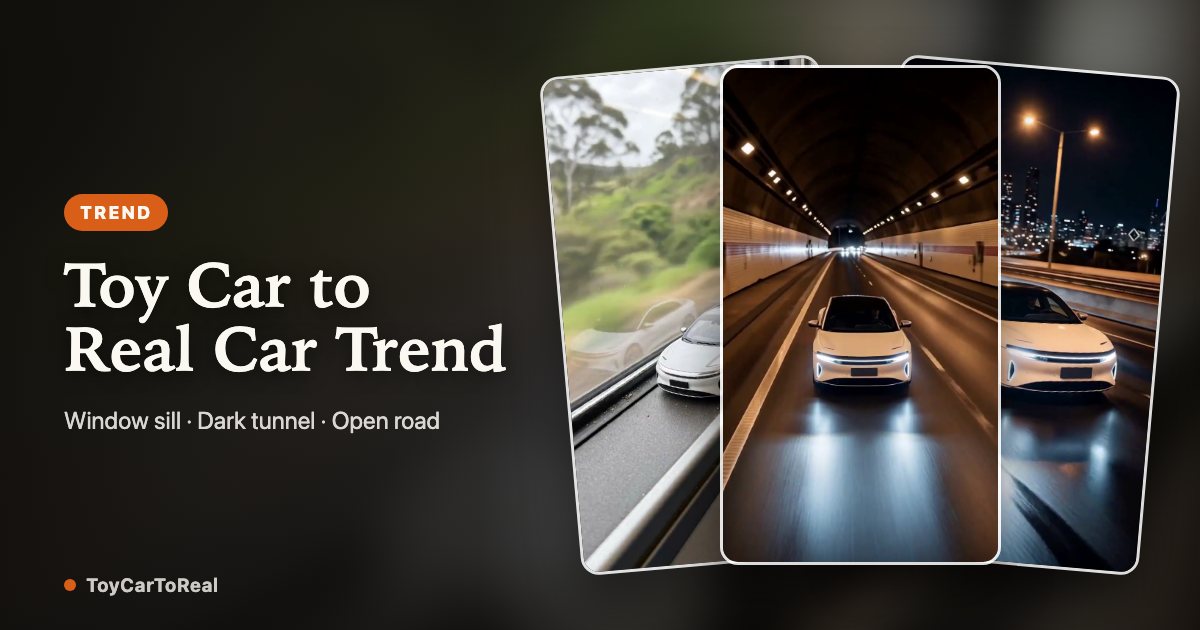
A model car sits beside a train window. The view goes dark, the camera moves, and a full-size version appears on the road. That is the core of the Toy Car to Real Car effect. Its appeal comes from a change of scale that is easy to follow, even without a caption. The visual idea took off in October 2026, popularized across Instagram and TikTok by creator @umutcancelikis with an unbroken train-to-tunnel transition. ToyCarToReal operates as an independent generator with no commercial affiliation with this creator, offering an automated workflow inspired by the format.
1. The story is a change of scale
The opening needs to tell the viewer that this is a miniature. A window ledge, the edge of a table or a display shelf gives the car a size reference. Small reflections and a close camera position help establish the scene, but they are not enough on their own. If the background gives no clue to scale, the first car may already look full-size and the reveal loses its point.
The ending needs the opposite information: a road, lane markings, a tunnel entrance or a garage with believable proportions. Keep the vehicle recognizable between those two settings. Paint color is a useful first connection, followed by the roofline, headlights and wheels. The idea does not depend on a particular make or a luxury car. A familiar everyday vehicle can make the size change feel more personal.
2. Why the train window helps
A train window brings a useful contrast into one shot. The ledge feels close and still, while the landscape outside suggests movement and distance. A small car against that background is clearly an object inside a larger world. When the camera follows it toward the glass, the viewer is already looking in the direction where the full-size car can appear.
A tunnel creates a natural dark interval. That interval can hide a cut, a change of setting or an AI transition, provided the direction of travel still makes sense. Darkness alone does not make two scenes connect. A car pointing left before the tunnel and suddenly pointing right afterward can feel like a different shot. Think about the position, angle and direction as one continuous sequence before adding dramatic light or sound.
3. Filming and AI are different production routes
A filmed version can use a real model car, a real vehicle and two carefully matched shots. The editor joins them at a moment when motion or darkness covers the switch. You control the physical car details, but matching scale, perspective and lighting takes planning. You also need permission to film in each location and should keep the shoot away from moving traffic.
An AI workflow instead uses a reference photo and a prepared scene or motion reference. It can invent the miniature, the road and the transition. That flexibility also introduces uncertainty: the model may redraw wheels, change the vehicle shape or produce movement that does not fit the road. A generated result should be judged as a new piece of imagery, not as a guaranteed copy of the reference photograph.
4. Make the reference photo do less guessing
Choose a photo where one car is easy to separate from its surroundings. A side or three-quarter view normally reveals more useful information than a very close crop of a grille. Keep both the body outline and visible wheels in frame. A little space around the car gives you room to crop later, while a vehicle that occupies only a tiny part of the image may not provide enough detail.
Even daylight makes the paint and panels easier to read. Strong reflections are not automatically bad, but they can hide the edges that identify the car. A covered bumper, a person standing across a door or a second vehicle overlapping the body leaves missing information for the model to invent. Start with a clear image before trying fog, darkness or heavily edited reference photos.
5. Keep a small set of identity cues
Before generating, decide what makes this particular car recognizable. It might be a blue body with a white roof, a boxy profile, round headlights or a specific wheel shape. Check those cues throughout the result, especially during the reveal. A frame can look attractive in isolation while still failing to match the vehicle shown at the beginning.
Badges, lettering and number plates are harder details to rely on. Treat them as items to inspect rather than guaranteed outputs. If a plate contains personal information, remove it from the source before uploading. Do not describe a generated video as an accurate representation of a car for sale if its features, modifications or condition have been changed. A creative reveal and a product record serve different purposes.
6. Plan the ~10s or ~15s sequence
The ~10s or ~15s sequence has three jobs: establish the toy, make the handoff, and show the full-size car. Keep the setup clear, use the tunnel to join the scenes and leave enough time for the reveal. Watch the entire clip at normal speed to check the pacing.
Plan the ending as well as the beginning. Does the full-size car leave the frame, continue on the road or stop in a garage? Each ending suggests a different pace. The current ToyCarToReal configuration offers ~10-second and ~15-second clips across three road scenes in 480p and 768p HD, with credit costs shown in the generator before you start. That is the configured video length; it does not describe how long generation takes.
7. Review movement, not just the first frame
Pause on the toy, the handoff and the full-size car, then watch the transition again without pausing. Look for wheels that slide sideways, reflections that suddenly reverse, doors that change shape or a vehicle that grows through the window frame. A strong poster image can hide these issues. The final check should include the full moving sequence and any sound that comes with it.
Also leave room for the interface of the platform where you plan to post. Important details near the edges may be covered by captions or buttons. Add music only when you have appropriate rights or can use the destination platform’s licensed audio features. Clearly label the result as AI-generated. The scale-change effect is a creative scene, not evidence that the depicted drive or event really happened.
8. Understand the examples and check your result
ToyCarToReal displays original concept animations and an AI-generated reference trial. The concepts explain the scene sequence; they are not customer results or proof that the model preserves every car. Your generation uses the photo you submit, and its vehicle details and motion need separate review.
Different cars can expose different weaknesses: a rounded hatchback, a long sedan, an SUV and a detailed model car each give the model different visual cues. Check consistency and motion through the whole clip. A good reference trial does not establish a success rate or guarantee your processing time. The photo guide explains how to prepare inputs and inspect your result.
Your Toy Car to Real Car moment is one photo away
Create my video