Toy Car to Real Car Prompt: 6 Copy-Paste Transition Templates
Last updated:
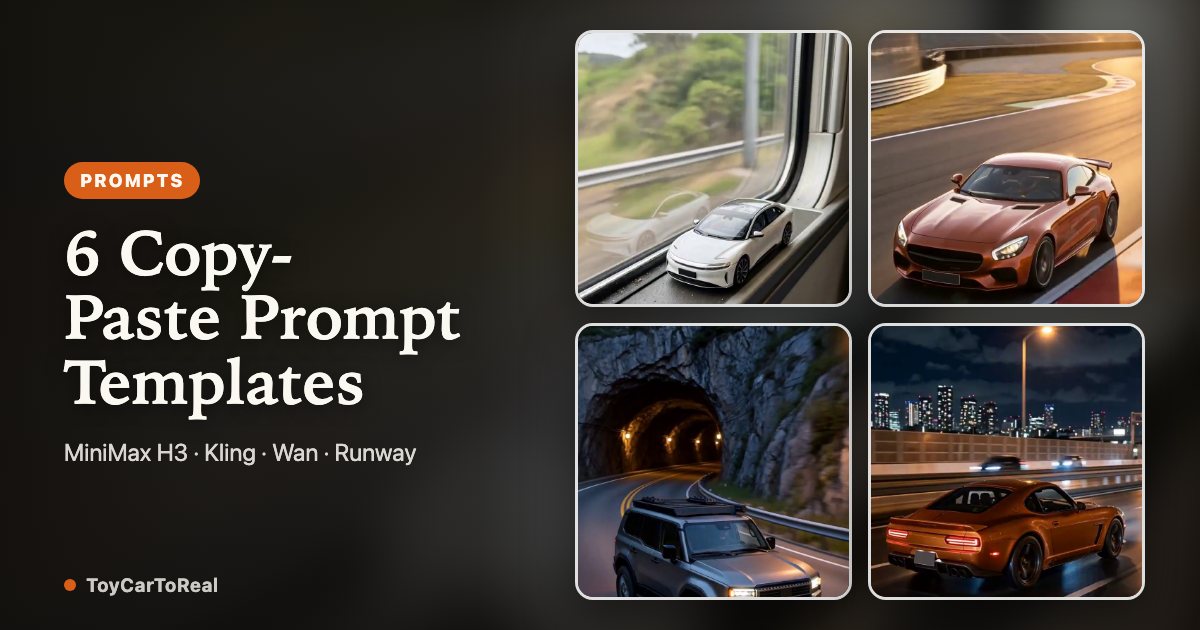
Creating a seamless toy car to real car transition requires more than a simple prompt. The video AI needs to preserve the vehicle’s identity—its paint color, wheel geometry, and proportions—while executing a believable scale jump through a dark interval. This guide provides 6 field-tested structured prompts, explains how negative constraints eliminate hallucinations, and shows when a dedicated one-click pipeline beats manual prompt tuning.
1. The 4-part structure of a toy car to real car prompt
A reliable toy car to real car video prompt consists of four distinct components: subject binding, miniature scene anchoring, transition camouflage, and full-size reveal physics. Omitting any of these four causes the AI model to drift into hallucinations—such as inventing random body shapes or generating people.
First, the prompt must bind directly to the input image, explicitly instructing the video model to transfer the vehicle's paint, rim design, body profile, and lighting contours without modification. Second, the miniature scene needs scale cues—such as an interior train window ledge or table edge. Third, the handoff requires a visual mask, such as an entering tunnel or passing shadow, where the scale switch occurs. Finally, the exit must set realistic road conditions, lane markings, and asphalt reflections.
2. Six tested toy car to real car prompt templates (copy-paste ready)
Below are six structured prompt templates tested on MiniMax H3 (Hailuo), Kling, and Wan, with tuning notes for adapting each template to Seedance and Runway. Each template follows the same reference-replacement schema and now spells out the four parameters that decide whether a take survives: aspect ratio, duration, camera move, and negative constraints. Replace the bracketed vehicle details with your own car (or use our automated tool to lock the reference image automatically), paste the block into your video engine, and apply the platform notes under each template. Console field names vary by platform—set 9:16 vertical and the stated duration wherever the interface provides dedicated controls.
Template 1 (Sunset Train Window — The Classic Viral Reveal): "Replace the vehicle throughout the reference video with the exact car from the reference photo. Format: 9:16 vertical, 10 seconds (5-second cut ends at the tunnel exit, before the highway cruise). Scene: warm golden-hour sunset light through a passenger train window; a 1:18 miniature rests on the interior sill while scenery streaks past in horizontal motion blur. Camera: one slow dolly push toward the glass at constant speed, level horizon, no handheld shake, no zoom, no cut. Handoff: as the carriage enters a dark mountain tunnel, cabin reflections fade to black and the window frame expands past the screen edge — the scale change happens only inside that darkness. Reveal: the same car at full size cruising an illuminated mountain highway at dusk, keeping the opening left-to-right orientation. Constraints: keep exact paint hue, wheel design and body proportions identical at both scales; one vehicle only; no people, no logos, no text, no readable plates, no cut, no second car."
Template 1 platform notes — MiniMax H3: paste as written and add "warm golden hour grade" (MiniMax H3 follows explicit lighting words closely); set 10s, 9:16. Kling: image-to-video with the car photo as first frame, duration 10s, and move "no cut, no second car" into the negative prompt field. Adapting for Seedance / Runway: keep "single continuous take, constant dolly speed"; on Runway, brush motion only on sky and road surface, never on the car body.
Template 2 (Neon Night Highway — Urban Drift): "Replace the vehicle with the exact car from the reference photo. Format: 9:16 vertical, 10 seconds (5-second cut ends on the tunnel exit). Scene: a miniature model car on a twilight city observation ledge, wet asphalt reflections below. Camera: slow dolly push forward at constant speed toward a dark subway underpass, no pan, no whip, no cut. Handoff: scale transition occurs only in the underpass shadow as reflections drop to black. Reveal: the same full-size car emerging onto a wet multi-lane urban expressway at night under neon skyscraper lighting, same heading and framing as the opening shot. Constraints: preserve wheel spokes, body silhouette and factory paint finish exactly; one vehicle only; no pedestrians, no distorted badges, no readable license plates, no text, no cut."
Template 2 platform notes — MiniMax H3: add "cool neon grade, wet asphalt specular highlights"; set 10s, 9:16 vertical. Kling: image-to-video, 10s; rewrite the camera line as "slow zoom push" if you use the built-in zoom control instead of a dolly. Adapting for Seedance / Runway: state that reflections must stay continuous across the handoff—this is the frame where neon streaks break and give away the cut.
Template 3 (Coastal Cliffside Drive — Ocean Panorama): "Replace the vehicle with the exact car from the reference photo. Format: 9:16 vertical, 10 seconds (5-second cut goes straight from tunnel darkness to the cliff road). Scene: a detailed scale car on a train window sill overlooking deep blue ocean waves, horizon locked level across the frame. Camera: slow dolly push through the glass toward the horizon, constant speed, no tilt, no roll. Handoff: the carriage passes into an arched coastal rock tunnel; reflections and ocean light fall away before the scale expands. Reveal: the same full-size vehicle driving a winding Pacific cliffside highway in clear daylight, horizon still level, same left-to-right heading. Constraints: maintain roofline curvature and rim detail between miniature and real form; one vehicle only; no spectators, no synthetic text, no readable plates, no cut."
Template 3 platform notes — MiniMax H3: keep "horizon locked level"—it is the one line that stops ocean tilt drift; set 10s, 9:16. Kling: 10s, first-frame upload; add "no camera roll" to the negative prompt. Adapting for Seedance / Runway: write "horizon stays level through the shot"; on Runway, brush motion on waves only and leave the cliff line untouched.
Template 4 (Rainy Night Overpass — Atmosphere & Mist): "Replace the vehicle with the exact car from the reference photo. Format: 9:16 vertical, 10 seconds (5-second cut ends as the car clears the overpass). Scene: a scale model on a rain-streaked window ledge above evening traffic, raindrops sliding down the glass. Camera: slow dolly push into the underpass shadow, constant speed, stable raindrop perspective, no cut. Handoff: the scale transformation happens inside the overpass shadow while the rain streaks continue unbroken across the glass. Reveal: the same full-size car on a rainy highway at night with wet tire mist and glowing taillights, rain density matching the opening shot. Constraints: keep authentic headlight shape, metallic paint tone and wheel styling; one vehicle only; no stray pedestrians, no unprompted badges, no readable plates, no text, no cut."
Template 4 platform notes — MiniMax H3: add "rain streaks continuous on the glass in every frame"; set 10s, 9:16. Kling: 10s; if raindrops vanish after the handoff, reinforce rain continuity and add "no dry glass" to the negative prompt. Adapting for Seedance / Runway: use first-frame identity lock on the car, and brush motion on rain and tire mist rather than the bodywork.
Template 5 (Desert Canyon Dawn — Open Horizon): "Replace the vehicle with the exact car from the reference photo. Format: 9:16 vertical, 10 seconds (5-second cut ends at the canyon tunnel mouth). Scene: a model car on a vintage train carriage sill with red rock canyon cliffs drifting past. Camera: slow dolly push toward the cavern tunnel mouth, constant speed, no cut, no zoom. Handoff: the train plunges into a dark cavern tunnel; red rock reflections disappear, then the scale expands in the darkness. Reveal: the same full-size car crossing an open desert highway at dawn under a pastel gradient sky, dust trail behind the rear wheels. Constraints: preserve vehicle trim, rims and body contours; one vehicle only; no bystanders, no artificial license plates, no text, no cut."
Template 5 platform notes — MiniMax H3: add "pastel dawn gradient sky, no sun flare"; set 10s, 9:16. Kling: 10s; add "no crowd, no roadside spectators" to the negative prompt—desert scenes attract generated bystanders. Adapting for Seedance / Runway: write "dust trail behind the rear wheels only"; on Runway, brush motion on the road, not on the car.
Template 6 (Alpine Mountain Pass — Switchback Reveal): "Replace the vehicle with the exact car from the reference photo. Format: 9:16 vertical, 10 seconds (5-second cut ends at the tunnel exit). Scene: a die-cast model car on an alpine train window ledge with snow-capped peaks passing by. Camera: slow dolly push through the glass toward the mountain tunnel entrance, constant speed, no cut, no handheld shake. Handoff: the train enters the mountain tunnel and the snowy reflections go dark before the scale expands. Reveal: the same full-size car navigating sweeping alpine switchbacks on clean asphalt among pine forests, light snow spray off the rear tires. Constraints: maintain original bodywork dimensions, rim spoke detail and paint color without distortion; one vehicle only; no pedestrians, no legible plates, no text, no cut."
Template 6 platform notes — MiniMax H3: add "crisp alpine daylight, light snow spray off rear tires"; set 10s, 9:16. Kling: 10s, first-frame upload; include "keep original body proportions" in the prompt and place exclusions in the negative prompt field. Adapting for Seedance / Runway: state "single vehicle on the switchback, no oncoming traffic"—mountain roads often trigger a second car in our MiniMax H3, Kling and Wan tests.
| Preset Scene | Lighting Atmosphere | Handoff Mechanism | Best Vehicle Colors |
|---|---|---|---|
| Sunset Train Window | Golden hour sunset | Mountain railway tunnel | Warm tones, silver, dark gray |
| Neon Night Highway | Cool neon & wet reflections | Subway underpass | White, black, electric blue |
| Coastal Cliffside | Bright daylight | Arched stone cliff tunnel | Red, yellow, vibrant blues |
| Rainy Night Overpass | Moody rain & streetlamps | Highway overpass shadow | Gunmetal, dark green, black |
| Desert Canyon | Dawn pastel gradient | Cavern rock tunnel | Earthy tones, orange, white |
| Alpine Mountain Pass | Crisp alpine daylight | Mountain tunnel | Silver, blue, metallic red |
3. Negative constraints: stopping hallucinations on MiniMax H3, Kling, Seedance and Runway
Video diffusion models frequently struggle with vehicle identity. Without strict negative constraints, models tend to add unintended pedestrians near the road, paste garbled fake brand logos on the hood, or generate warped text resembling random license plates.
Always append explicit exclusions: "Do not add people, logos, text or readable number plates." Furthermore, specify that wheel geometry and paint finish must remain locked between the opening miniature shot and the final full-size reveal. This instruction prevents the model from turning an alloy wheel into a generic steel wheel during the tunnel transition. When adapting for Seedance or Runway, place the same exclusions in the negative prompt field or append them to the main prompt.
4. Why reference photo quality dictates prompt success
Even the most meticulously crafted prompt cannot compensate for an ambiguous source image. If the car photo is cropped too tightly, taken at an awkward vertical angle, or obscured by heavy shadows, the AI model must invent the missing panels and wheels during generation.
For optimal results, photograph the car from a three-quarter front or side angle in clean, even daylight. Ensure all visible wheels and the complete roofline are in the frame. For detailed guidelines on preparing your image, read our comprehensive photo guide.
5. Manual prompt tuning vs. dedicated one-click generation
Running raw text-to-video or image-to-video diffusion on general-purpose platforms (such as Kling or Wan 2.1) typically requires 5 to 10 test renders before achieving clean scale continuity and stable wheel geometry. At $0.20 to $0.50 per generation attempt, manual prompt iteration quickly becomes time-consuming and expensive.
ToyCarToReal encapsulates these tested prompt structures, optimized motion seeds, and scale-transition references into a streamlined ~10s or ~15s vertical workflow. You provide one car photo; the platform handles scene lighting, tunnel handoff, and detail preservation—with 480p (from 9 credits) and 768p HD (up to 18 credits for ~15s) packs starting at just $6.99 and automatic credit refunds if a render ever fails.
6. Start creating your car transition
Whether you choose to experiment with prompts in standalone video tools or use our automated generator, the secret to a viral car transition lies in respect for the vehicle's authentic geometry and smooth motion handoff.
To explore how the visual psychology of the train-window transition became a TikTok and Reels sensation, consult our trend analysis. When you are ready to produce your video in one click without prompt tuning, simply upload your car photo on the home page.
Your Toy Car to Real Car moment is one photo away
Create my video